Zapier vs Make
Zapier vs Make compared for readers choosing between shortlisted SaaS tools: pricing fit, workflow trade-offs, setup risk, and when to choose an alternative.
Buyer De-Risk Kit
Need to choose before the renewal or purchase?
Get one concise USD 19 buyer-side risk check for up to three tools: fit, cost, workflow, switching risk, and the next step.
Decision Brief
What to do with this research
Zapier vs Make is worth shortlisting for readers choosing between shortlisted SaaS tools when the pricing, integrations, and operational trade-offs match your current constraints.
Head-to-Head Comparisons changes
Get a practical ToolPick alert when pricing, free-plan limits, policy risk, or alternatives change.
Weekly at most · one-click unsubscribe
Zapier vs Make is worth shortlisting for readers choosing between shortlisted SaaS tools when the pricing, integrations, and operational trade-offs match your current constraints.
- Use the comparison table to narrow the shortlist.
- Verify current pricing and plan limits before buying.
- Model the tool inside your full SaaS stack cost.
Keep reading for the full analysis.
Where this decision goes next
Skip the scroll: the pages most readers open after this one.
Notion vs ClickUp 2026: Which Project Management Tool Wins?Read the next related article.Zapier vs. Make: A Comprehensive Comparison for SaaS Users (2024 Edition)
Choosing the right automation platform can significantly boost your productivity and streamline your workflows. In the world of no-code automation, Zapier vs. Make (formerly Integromat) are two dominant players. This article provides a detailed comparison of Zapier vs. Make, designed to help SaaS developers, solo founders, and small teams make an informed decision about which platform best suits their needs in 2024. We'll dive into their features, pricing, ease of use, and more, ensuring you have all the information you need to optimize your automation strategy.
Overview of Zapier
Zapier is a leading no-code automation platform that connects your apps and automates workflows, often referred to as "Zaps." Its core strength lies in its ease of use and extensive app library, making it a popular choice for users of all technical levels. Zapier allows you to connect various applications, triggering actions in one app based on events in another. For example, you can automatically save email attachments to Google Drive, create Trello cards from new form submissions, or post updates to social media based on new blog posts.
Key Features and Strengths:
- Ease of Use: Zapier boasts a user-friendly interface and a simple setup process, making it easy for beginners to create basic automations.
- Large App Library: Zapier offers integrations with thousands of apps, covering a wide range of categories, from marketing and sales to productivity and collaboration.
- Established Ecosystem: With its widespread adoption, Zapier has a robust community and a wealth of resources available, including documentation, tutorials, and support forums.
- Reliability: Zapier is known for its reliability and uptime, ensuring your automations run smoothly without interruption.
Pricing:
Zapier offers a free plan with limited functionality. Paid plans are based on the number of tasks (actions completed in your Zaps) you need each month. These plans vary in price and features, allowing you to scale your automation as your needs grow.
Official Website: https://zapier.com/
Overview of Make (formerly Integromat)
Make (formerly Integromat) is a visual platform for building complex integrations and automations. Unlike Zapier's linear "Zap" approach, Make offers a more visual and flexible canvas for designing intricate workflows. It's particularly well-suited for users who need advanced data manipulation, custom logic, and greater control over their automation processes.
Key Features and Strengths:
- Visual Interface: Make's drag-and-drop interface provides a clear and intuitive way to visualize and build complex workflows.
- Advanced Data Manipulation: Make offers powerful data transformation features, allowing you to manipulate and reshape data as it flows through your automations.
- Granular Control: Make provides granular control over every step of your workflows, allowing you to customize the logic and behavior to meet your specific requirements.
- Complex Scenarios: Make excels at handling complex scenarios with advanced data mapping, error handling, and conditional logic.
Pricing:
Make also offers a free plan, but its paid plans are based on the number of operations (individual steps within your scenarios) you use each month. This pricing structure can be more cost-effective for certain use cases, especially those involving complex data transformations.
Official Website: https://www.make.com/
Key Differences: Zapier vs. Make
Here's a detailed breakdown of the key differences between Zapier and Make:
- Ease of Use: Zapier generally has a lower learning curve, making it easier for beginners to get started. Make, with its visual interface and advanced features, requires a bit more time to learn but offers greater flexibility.
- Complexity: Zapier is well-suited for simple, straightforward automations. Make shines when dealing with complex workflows, data transformations, and custom logic.
- App Integrations: Zapier boasts a larger app library overall, covering a wider range of applications. However, Make may offer deeper and more robust integrations for specific apps. It's crucial to check if both platforms support the specific applications you need to connect.
- Data Transformation: Make offers significantly more robust data transformation capabilities than Zapier. You can easily manipulate, filter, and reshape data as it flows through your workflows.
- Error Handling: Make provides more advanced error handling and debugging features, allowing you to identify and resolve issues more effectively.
- User Interface: Zapier's interface is simpler and more streamlined, while Make's visual interface offers a more comprehensive view of your workflows.
- Community and Support: Both platforms have active communities and comprehensive documentation. However, Zapier's larger user base may translate to more readily available support resources.
- Pricing: This is a significant differentiator, which we'll explore in more detail below.
Pricing Comparison (Updated for 2024)
The pricing structures of Zapier and Make differ significantly. Here's a comparison to help you understand which platform might be more cost-effective for your needs:
| Feature | Zapier | Make |
|---|---|---|
| Free Plan | Yes, limited tasks | Yes, limited operations |
| Paid Plans | Based on tasks (actions completed) | Based on operations (steps within scenarios) |
| Data Transfer | Included in task count | Measured separately in some plans |
| Multi-Step Zaps | Available in paid plans | Available in paid plans |
| Apps/Integrations | Thousands | Hundreds, but often deeper integrations |
| Example Scenario: | Simple Marketing Automation (e.g., adding new subscribers to a CRM) | Complex E-commerce Integration (e.g., synchronizing inventory across multiple platforms) |
Considerations:
- Task vs. Operation: A single Zapier task represents a completed action, while a single Make operation represents a step within a scenario. A complex scenario in Make might involve multiple operations, potentially making it more expensive than a simple Zap in Zapier.
"A task is an action your Zap successfully completes." — Zapier Help Center
- Data Transfer: Be mindful of data transfer limits, especially if you're dealing with large files or datasets.
- Free Plan Limitations: Evaluate the limitations of the free plans to determine if they meet your basic automation needs.
Recent Updates: Always check the official websites of Zapier and Make for the most up-to-date pricing information, as they frequently update their plans and features.
User Reviews and Insights
Analyzing user reviews from reputable SaaS review sites like G2, Capterra, and TrustRadius provides valuable insights into the real-world experiences of Zapier and Make users.
Zapier:
- Pros: Users consistently praise Zapier for its ease of use, extensive app library, and reliable performance.
- Cons: Some users find Zapier's pricing to be expensive, especially for complex workflows that require multiple tasks. Others have noted limitations in its data transformation capabilities.
Make:
- Pros: Users appreciate Make's visual interface, advanced data manipulation features, and flexibility in building complex workflows.
- Cons: Some users find Make's learning curve to be steeper than Zapier's. Others have noted that its app library is smaller, and its pricing can be confusing.
Use Cases
Here are some specific examples of use cases where each platform excels:
Zapier is a Better Fit For:
- Simple Marketing Automation: Connecting lead capture forms to email marketing platforms.
- Basic Web App Integrations: Syncing data between common web applications like Google Sheets, Slack, and Trello.
- Quick and Easy Automations: Automating repetitive tasks that require minimal data manipulation.
Make is a Better Fit For:
- Complex Data Integrations: Integrating multiple data sources with advanced data transformation requirements.
- Custom Workflows: Building highly customized workflows with conditional logic and error handling.
- E-commerce Automation: Synchronizing inventory, processing orders, and managing customer data across multiple e-commerce platforms.
- API Integrations: Connecting to custom APIs and building complex integrations with third-party services.
Pros and Cons
Here's a summary of the key pros and cons of each platform:
Zapier:
Pros:
- Easy to use
- Large app library
- Reliable performance
- Established ecosystem
Cons:
- Can be expensive for complex workflows
- Limited data transformation capabilities
Make:
Pros:
- Visual interface
- Advanced data manipulation
- Granular control
- Handles complex scenarios well
Cons:
- Steeper learning curve
- Smaller app library (compared to Zapier)
- Pricing can be confusing
Which Platform is Right for You?
Choosing between Zapier and Make depends on your specific needs and requirements. Consider the following factors:
- Technical Expertise: If you're a beginner with limited technical skills, Zapier might be a better starting point. If you're comfortable with more complex concepts and have some coding experience, Make could be a good fit.
- Budget: Carefully evaluate the pricing plans of both platforms and estimate the cost for your specific use cases.
- Complexity of Workflows: If you need to build simple, straightforward automations, Zapier is likely sufficient. If you require complex data transformations, conditional logic, and custom integrations, Make is a better choice.
- Integration Needs: Check if both platforms support the specific applications you need to connect. Consider the depth and robustness of the integrations.
Recommendations:
- Solo Founder/Small Team with Basic Needs: Start with Zapier's free plan and upgrade as needed.
- SaaS Developer Building Complex Integrations: Explore Make's advanced features and visual interface.
- E-commerce Business Automating Multiple Processes: Consider Make's data transformation capabilities and granular control.
Alternatives to Zapier and Make
While Zapier and Make are leading platforms, here are a few alternatives worth considering:
- n8n: An open-source workflow automation platform with a focus on extensibility and customization. https://www.n8n.io/
- Pipedream: A serverless integration platform designed for developers. https://pipedream.com/
- Workato: An enterprise-grade integration platform with a focus on scalability and security. https://www.workato.com/
Conclusion
Both Zapier vs. Make are powerful automation platforms that can significantly improve your productivity. Zapier vs. Make cater to different needs and skill levels. Zapier excels in ease of use and a vast app library, making it ideal for simple automations. Make, on the other hand, offers a visual interface, advanced data manipulation, and greater control, making it suitable for complex workflows. Carefully evaluate your specific requirements, budget, and technical expertise before making a decision. By understanding the key differences between these platforms, you can choose the one that best empowers you to automate your business processes and achieve your goals. Remember to always check the latest pricing and features on their official websites before making a final decision. Good luck!
Related ToolPick Decisions
Use these adjacent guides to check pricing, migration, and workflow risk before committing:
- No-code Automation SaaS - Continue the same decision path with a related SaaS stack trade-off.
- AI Code Review Tools - Continue the same decision path with a related SaaS stack trade-off.
- Best AI Low-Code, No-Code, and No-Code Machine Learning Platforms in 2026 - Continue the same decision path with a related SaaS stack trade-off.
Continue the Evaluation
For adjacent buying guides, use the ToolPick blog hub to compare related workflows before committing budget or changing the operating stack.
Frequently Asked Questions
Who is Zapier vs Make for?
It is for readers choosing between shortlisted SaaS tools who need a practical shortlist instead of a generic directory page.
What should I verify before choosing?
Verify current pricing, free-tier limits, security terms, integration depth, and migration cost on the vendor site before committing.
Send it to a teammate or save it for the next renewal check.
📬 Get the Weekly SaaS Digest
New tool reviews, pricing-change alerts, and stack cost tips — one email a week, one-click unsubscribe. No spam, no fake urgency.
Turn this article into a decision path
Every ToolPick article should lead to a second useful page: another article, a hub, or a calculator action.
Notion vs ClickUp 2026: Which Project Management Tool Wins?Read the next related article.Related Articles
Notion vs ClickUp 2026: Which Project Management Tool Wins?
Notion vs ClickUp 2026 compared for shortlisted SaaS tools: pricing fit, workflow trade-offs, setup risk, and when to choose each option.
 Decision Guides
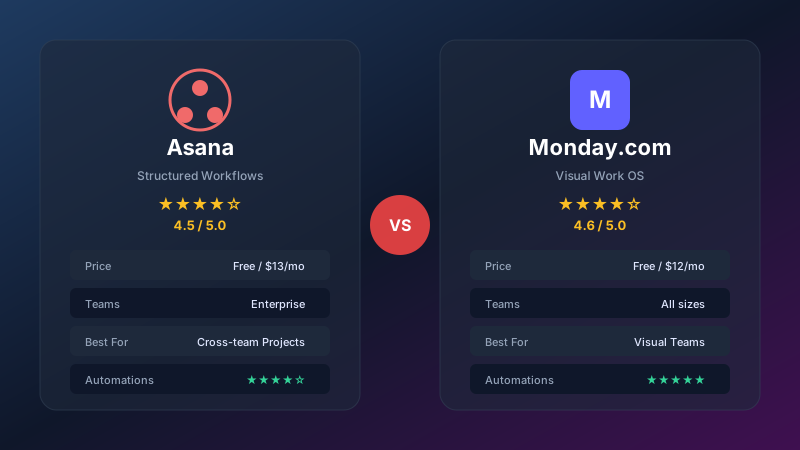
Asana vs Monday.com 2026: Which Project Management Tool Is Right for You?
We compare Asana and Monday.com head-to-head on pricing, features, ease of use, automations, and integrations. Find out which PM tool fits your team best.
 Decision Guides
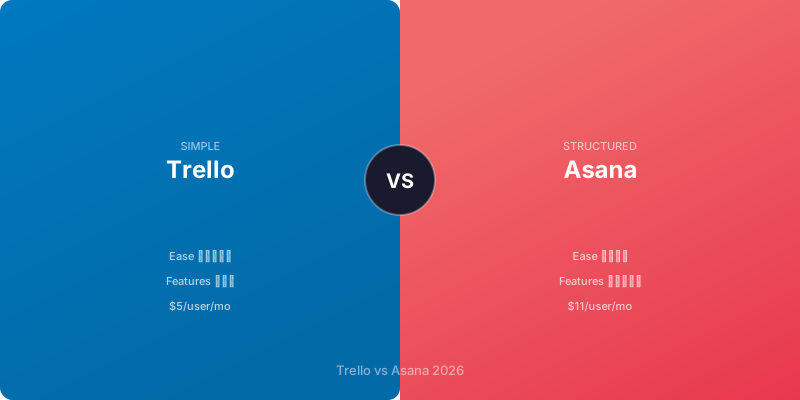
Trello vs Asana 2026: Which Project Management Tool Fits Your Team?
Trello vs Asana 2026 compared for shortlisted SaaS tools: pricing fit, workflow trade-offs, setup risk, and when to choose each option.